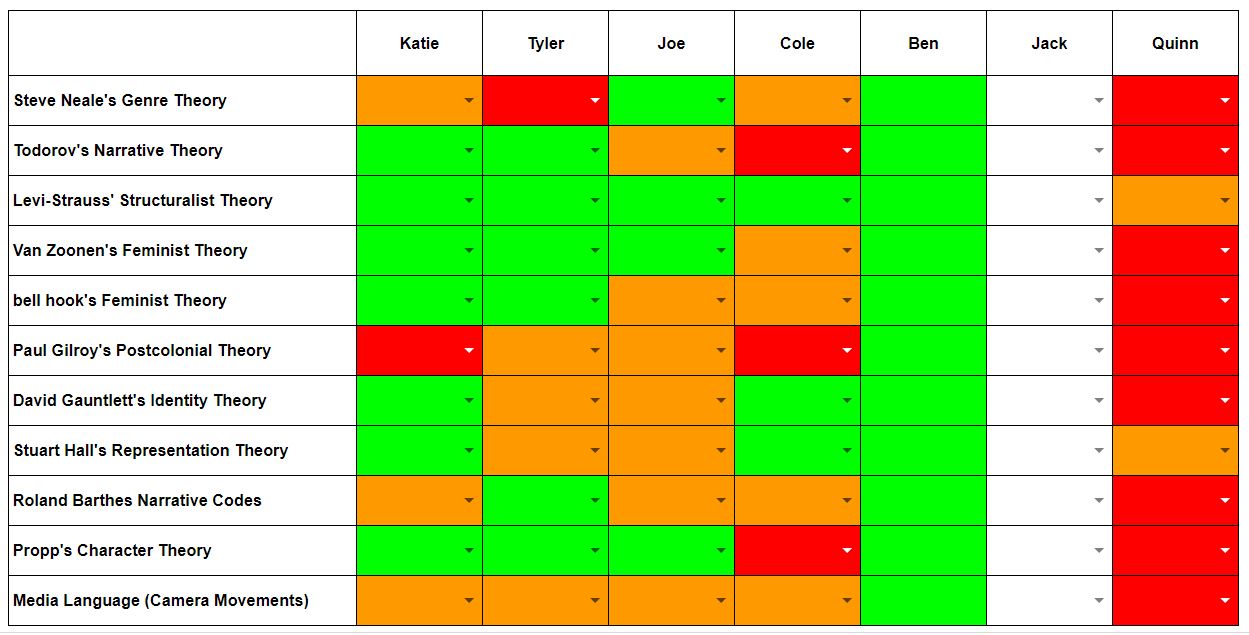
Before we start with today's new learning, you must retake the critical perspectives test. Remember, the result from this test will inform my intervention strategy (see you Friday!).
SMART START
Yes, it's 'use your pencil as a camera' time! I'll suggest 5 camera movements and you need to use your pencil to demonstrate your understanding of the technical code!
LEARNING CHECK
How many camera movements could you demonstrate?
THE BIG PICTURE
What is the media language associated with camera angles, camera distances, lighting and editing?
EXPLAIN
We will use the Audio / Visual Media Language page in the sidebar to define camera angles, distances, lighting & editing.
PRACTISE
In your online learning journal, create a post entitled 'Audio Visual Media Language'. List and categorise all of the media language from my teaching blog. For each item in your list, create a hyperlink to the AV example from the teaching blog. If I haven't provided an example, find your own, host in your Google Drive and provide a hyperlink as before.
Then, in the same post, describe the first 2 minutes of following extract using as much media language as possible. I want to be able to visualise the clip in my head from just your description. Consider...
Camera distances
Camera angles
Camera movement
Soundtrack
Lighting
Editing
LEARNING CHECK
How much have you taken on board? Without referring to your online journal (or my media language page), complete the following learning check. How many of the media language examples can you label?
At the end of the test, take a screenshot of your certificate (using Snipping Tool) and post on your blog in a separate post (Media Language Learning Check 1).
It won't surprise you to hear that you will retake this quiz (very soon!), so you need to revise all of the media language defined today. You will keep retaking this test (or something similar) until you have mastered this language!
HOMEWORK
Learn all of the media language covered today. Next week, we will review the media language associated with print products.
Guess what? I think we'll start this lesson with a quick critical perspectives test. You know what you have to do and the times you have to beat! Remember, the only person you have to beat is your previous self (and Katie).
I've marked your work and updated the monitoring document. You can spend this lesson reflecting on and responding to the feedback. This includes making improvements to your Magazine Page & Match-on-Action NEA tasks. You can also address the comments I've made on your returned assignment. You can resubmit your assignments once you have addressed the issues I have raised.
My main observation from marking your assignments is that you need to develop essay writing techniques; deciding a structure and maintaininn an academic register throughout. Maybe this structure will help you...
To help you remember the basics for the critical perspectives relating to media language & representation, I have created the following ebook. Click on the link to read online.
At the start of today's lesson, you will retake the Critical Perspectives Matching Task. Is there anyone who can beat Katie?
In today's lesson, you will exhibit your match-on-action sequence. We will review each sequence looking out for;
Continuity (and continuity errors)
Accurate MOA edits (looks like a single action)
The use of a supportive underscore
The use of realistic, balanced sound effects
We will rank order the sequences to discover the winner of the inaugural Cheslyn Hay Film Festival. I would like to submit my own sequence. How does yours compare to my benchmark production?
The rest of today's lesson will be dedicated to the development of your WaterAid documentary. This will be completed in next Friday's NEA lesson (focusing on Premier Elements skills).
At the start of next Thursday's lesson, we will start our unseen text analyse programme. Once a week, you will be given an unseen text (still or moving image) and asked to review it considering one of the critical perspectives we have studied so far. I will use this mini-assessment to inform my weekly intervention strategy (directing you to attend a catch-up session for each critical perspective you don't know or apply inappropriately). There is no way to magically impart the ability to label these critical perspectives; you just have to learn them the old fashioned way. However, here is a knowledge organiser covering the critical perspectives for 'media language' and 'representation'.
At the start of today's lesson, you will complete the Tide / Kiss of the Vampire assessment. You can access the assignment via our Google Classroom. You will have 30 minutes to complete this assessment.
THE BIG PICTURE
WALT: How do we apply the theoretical frameworks we have studied so far to the 'WaterAid' advert? EXPLAIN & MODEL
We will go through the fact sheet for the WaterAid advert (see sidebar), defining any terms that you are unfamiliar with and clarifying any misconceptions. You would be wise to make notes during this phase of the lesson. PRACTISE
To demonstrate your understanding of the text, you are going to construct a documentary. You have the following resources available to you;
A copy of the WaterAid advert
Adobe Premier Elements
A USB microphone (we only have 1 for the class)
Access to AudioBlocks
In the making of your documentary, you may exploit the following techniques & codes;
A voice-over
Titles (overlays)
Intertitles
Pause & talk
Other creative approaches do exist and you are welcome to consider alternatives.
REVIEW
At the end of the lesson, we will use 'Talking Chips' to share our new knowledge. Whoever is the last person holding a chip... is the loser!
Unfortunately, only half of the class will be with us today. Therefore, we will use the time to regroup and to embed learning. You will complete the following tasks;
Set up own learning journals (blogs) if you haven't already
Publish a post summarising each of the theorists we have covered so far (see below)
Complete and publish all of the NEA skill-building tasks covered so far (see below)
Complete and publish your Tide & Kiss of the Vampire annotations
Each of your practical tasks should be submitted as an assignment on Google Classroom.
Once you have completed all of the tasks above, you may collect your flash drive and start to edit your 'MOA' clip using Adobe Premier Elements.
Summary of Theorists Studied So Far
Steve Neale's Genre Theory
Todorov's Narrative Theory
Levi-Strauss' Structuralist Theory
Van Zoonen's Feminist Theory
bell hooks' Feminist Theory
Paul Gilroy's Postcolonial Theory
David Gauntlett's Identity Theory
Stuart Hall's Representation Theory
Roland Barthes' Narrative Codes
Propp's Character Theory
Summary of NEA Skill-Building Tasks Studied So Far
Fantasy Romance Movie Poster: Blending Images (in Photoshop Elements)
War Film Movie Poster: Making Selections (in Photoshop Elements)
SMART START
At the start of today's lesson, you will demonstrate your understanding of media language relating to camera movements, angles and shot types (see sidebar for revision).
LEARNING CHECK
Following the smart start assessment, you will be placed in groups for today's practical work. The structure of the groups will be informed by the smart start outcomes!
THE BIG PICTURE
WALT: How do you construct a moving image sequence that observes the basic rules of filming to establish a linear narrative that follows the conventions of continuity editing? EXPLAIN The Basic Rules of Filming... Continuity Editing
MODEL
I will quickly direct the shooting and editing of a single match-on-action shot as an example. You will be my crew & actors! PRACTISE
Your task in the second half of the lesson is to plan and shoot a short film sequence that demonstrates your understanding of the rule of thirds, the 180 degree rule and, once edited, match-on-action & continuity editing. The Brief
Plan and shoot a short sequence, lasting no longer than a minute once edited, that represents a journey from A to B. In your sequence, your protagonist must have a motivation to get to point B (e.g. to meet a deadline, to prevent something happening, etc). You must include;
A minimum of 3 match-on-action shots
A variety of shot types, including a least one extreme close up (see media language page in sidebar)
A least one element of camera movement (side media language page in sidebar)
Rules
No dialogue!! (we will add sound effects and an underscore afterwards, but not words!)
No inappropriate activities (drugs, smoking, sexual references, etc)- If in doubt, leave it out!
You will each edit your own version of the sequence
Planning
How will you plan? On the fly? Storyboard? Location recce?
How will you allocated roles within the film crew?
Who will you use as actors?
The Prize
All sequences will be submitted into the 'Cheslyn Hay A2B Short Film Festival'. The sequence voted the best by the judges will win...
REVIEW
At the end of the lesson, you will exhibit your personal edit of the sequence. The critic (me) will evaluate your success and declare somebody the winner!
I'm afraid I'm at a meeting in London today, so can't be with you. However, that doesn't stop us does it!
THE BIG PICTURE
WALT: How do we apply the theoretical frameworks we have studied so far to the 'Tide' & 'Kiss of the Vampire' set texts?
EXPLAIN (TIDE ADVERT)
In a post entitled 'Tide Advert', list and define the terms below (or a Google Doc if you still haven't got a blog). You may research the terms using the internet or any other resource. All these terms are used in the Tide fact sheet (in sidebar) but they aren't explained or defined. It is important that you understand what they mean! You can support your definitions with examples, illustrations, graphics, hyperlinks to sources, etc. Help each other too.
Copy (look at the definitions on the classroom wall)
Z-Line
Rule of Thirds
Serif
Sans-Serif
Dress Code
Mode of Address
Lexis
Hyperbole (pronounced "Hi-per-bal-lee")
Superlative
Tripling
PRACTISE (TIDE ADVERT)
Using our desktop published of choice (QuarkXpress) annotate an image of the Tide Advert (use the 'snipping' tool to take a screenshot from the fact sheet). Use the fact sheet (see sidebar) and your new understanding of key terms to complete the annotation. I only want you to consider the most important information from the following sections of the fact sheet though;
Part 1: Media Language
Part 2: Representation
Do not try to include every piece of information; just the key stuff and, for now, ignore Part 3, the 'Audiences' section, of the fact sheet (we haven't covered these theoretical frameworks yet).
MODEL
Here is my example of what your annotation may look like at the beginning (with only one annotation though - I wouldn't want you to copy me!)...
To make the arrow, I used the line tool and manipulated the width and end point. Have a go!
REVIEW
Once you have completed your annotation, export it as a PDF and submit it in our Google Classroom.
________________________________________________
KISS OF THE VAMPIRE
Repeat the same process for the 'Kiss of the Vampire' film poster. Start, once again, by defining the language used in the fact sheet in a new post.
Intertexts (look around the room for an example of intertextuality to help)
Gesture Code
Icon / Iconography
Again, submit your annotated PDF in our Google Classroom.
Identify the gaps in your own knowledge (I will confirm) and plan your revision timetable in preparation for your 'Individual Knowledge Gaps Retest' next week.
Explain
Today we will answer the following questions:
Present your understanding of these theories in your online journal. Use examples (from real media products if you can) to illustrate your full understanding.
Review
How developed is your understanding of the following theories & topics?
In the homework post (see earlier post), I've added some personal revision. This is based upon the outcomes of last lesson's smart start. Please make sure you fill these gaps in your understanding. Email me if you require further support.
Smart Start
List the Photoshop Elements skills & tools that you have developed and used so far.
Learning Check
For each element, identify how confident are you that you could apply the skill and use the tool if given an unsupported, independent project brief?
The Big Picture
In today's lesson you will answer the following questions;
What is QuarkXpress?
How do you use the Move Tool and the various Content Tools to construct a magazine page?
What is a pull-quote?
What is runaround?
What is Lorem Ipsum?
How do I export my completed page using the pdf file format?
Explain
To answer these questions, watch the training tutorial below. It was captured using QuarkXpress 9 on a Mac, but it is very easy to follow using QuarkXpress 2018 on PC. Just remember that when I say "frame" in the tutorial, I mean "border" in the PC version.
Learning Check & Practise
Using the techniques shared in the tutorial, create your own magazine page. You can use a found image as your main image and Lorem Ipsum as the copy. You must include a pull-quote, sidebar, drop capital, page furniture and folio information.
Review
You will export and share your completed magazine page. We will then peer-assess your success, identifying areas of strength and, maybe, some areas for development.
Visit the 'Media Language' page in the sidebar and learn the media language associated with 'Camera Movements' (3rd sub-section on the media language page).
Independent Homework
Tyler: Revise bell hook's feminist theory.
Jacques: Revise bell hook's feminist theory.
Joe: Revise bell hook's & Van Zoonen's feminist theories and Levi-Strauss' structuralist theory.
Ben: Revise bell hook's feminist theory & Todorov's narrative theory.
In the second of this week's lessons, we will continue to develop some basic NEA skills by answering the following question...
How do I construct a war film poster using selection tools, clone tools & blend modes
For this second Photoshop Elements project, use my screen cast as a guide (again, completed in Photoshop
CS6 but easily transferred to Photoshop Elements 2018).
Take screenshots at various stages so that you can publish a post outlining the workflow and explaining the tools you are using (use snipping tool).
Alternatively, you may download a paper workflow document.
Once again, you will need some stock images to start;
How can Barthes Narrative Codes and Propp's Character Theory help us to analyse media texts?
WILF
Explain Barthes Semiotics Theory using an example from our portfolio of set texts.
Explain Propp's Character Theory using your own example (not a set text).
Analyse one of our set texts, using some or all of the theories studied so far (over 2 weeks)
Explain
Barthes' Theory of Semiotics
A code is an aspect of a text from which the audience can derive meaning. We can do this through decoding or deconstructing the text; literally breaking it to pieces.
Roland Barthes was a French theorist who studied a variety of fields. Perhaps his most famous contribution to Media Studies was through his study of semiology. The following five codes can be very useful in the process of textual analysis. While you will be making far more use of some than others (action codes and enigma codes for example), learning to apply all five will prepare you for anything that may come up in the exam.
Hermeneutic/ enigma code - An enigma code is a mystery within a text that is not immediately answered. Examples could include "The man lies slumped with an ornate silver knife in his back. Who did it? Why did they do it? And why did they use such a weapon?" As an audience, we assume that this mystery is going to be solved at some point. If it isn't, the audience potentially will be frustrated. On the flip side, if the mystery is revealed too quickly (or if the audience is able to work it out too quickly!), then they could be let down. Writing a successful mystery is a difficult business!
Proairetic/ action code - Parts of a narrative which are related to things happening. For example "Gus glared at Gary, and started to crack his knuckles threateningly". At this point, the audience would probably guess that Gary is going to get punched! This code, along with enigma codes can create considerable suspense. Think about how many times James Bond has disarmed a ticking time-bomb with only one second on the clock! As an audience, we have decoded the action code of the time-bomb, and we assume that Bond is going to die, even though deep inside we know he definitely will survive!
Semantic code - Something within a text that means something, often multiple meanings. There can be many meanings within a single text.
Symbolic code - A part of a text that 'stands in' for, or means something else. For example the gold dress Nicole Kidman wears in the Chanel No.5 advert symbolizes wealth, luxury, glamour and even power. The deeper meaning of a text.
Referential code - Where a part of a text refers to something outside of the text. This assumes the audience has knowledge of whatever it is that the text is refering to. This is closely related to intertextuality, and often it can be the basis for humour. For example, The Big Bang Theory makes frequent reference to other texts, including Star Trek, Star Wars, and other aspects of 'nerd culture'. As an audience, you are more likely to get the joke if you have knowledge of these texts. Likewise, Neil Gaiman's Sandman comics take place in a world where seemingly all myths, legends, gods and comic book heroes exist. It requires a lot of background knowledge to fully comprehend every reference, but the audience can get by if they read it as a creepy story with many enigmas and symbolic codes.
Your 'Elves' images have been published (see 'Exhibition of Students' Work' in the sidebar). You have all demonstrated the ability to blend images using a layer mask and the gradient tool. Well done! Have at look at all the images. How successful was yours compared to the others? Are there any improvements you could make?
You should publish a post on your own blog detailing the skills you have developed (just a few sentences, not an essay) and presenting your final product. You should then add a short self-evaluation (WWWs & EBIs -What Went Well & Even Better If...)
In the second half of today's lesson will we complete the first of two Photoshop Elements projects;
A step-by-step Fantasy Romance movie poster (blending two images using a layer mask and the gradient tool)
Click here to access the tutorial for the first project. Although the original project was completed in Photoshop CS6, we can easily transfer the skills to our Photoshop Elements environment. We will work through this project together.
To complete the project, you will need the following images;
Post the date and title on your blog. Respond to the objective questions, supporting your learning with hyperlinks, images, videos, etc. You will have a short test relating to these theories next lesson (cue dramatic pantomime baddie music).